
Key Take Aways
- Covers testing input basics for both individuals and groups, including the stopwatch tool and entering data into testing fields, plus step-by-step guides for inputting values for a single athlete.
- Also links guides for testing a whole group of athletes at once and entering 1RM data during group testing.
TESTING
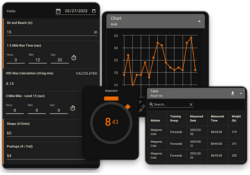
Testing Input: A Detailed Overview
Dive into testing for both groups and individuals. Learn about using the stopwatch tool and inputting your data into the testing fields.

How To: Input Testing Values for an Individual User
Check out this step-by-step guide to help you create and save circuits for future use!

How To: Test a Group of Athlete
Save time during testing by learning how to test whole groups of athletes in the CoachMePlus app.

How To: Enter 1RM Data in Group Testing
Get ahead of your testing data by exploring this article on how to enter 1RM data for group testing in the CoachMePlus app.
Recent Comments