
Key Take Aways
Human Performance Specialist Mike Gallivan reviews the upgraded functionalities of the CoachMePlus Nutrition Module, including:
- The CoachMePlus nutrition module lets coaches and dietitians set macronutrient targets, calorie goals, and full meal plans for individual athletes, using calculators like Mifflin-St Jeor to estimate daily calorie needs.
- Coaches can monitor athlete progress in real time, including macronutrients, calories, and micronutrients, and plot nutrition data alongside training load, sleep, and hydration.
This post is adapted from a video walkthrough by Mike Gallivan, Human Performance Specialist at CoachMePlus, covering everything new in the upgraded Nutrition Module. Rather than rewrite his explanation into something more clinical, we’ve kept it close to how he actually talks through the tool with coaches and dietitians day to day – practical, a little conversational, and grounded in real scenarios he’s seen across pro sports, tactical teams, and everyday athletes. If you’d rather watch the full breakdown yourself, the video is linked below. Otherwise, here’s Mike’s walkthrough of what’s new:
We’re walking through the nutrition module within CoachMePlus, and it’s built with the practitioner in mind- the dietitians and the nutritionists – but can be used by any staff member as determined by your organization.
You can customize macronutrient targets and calorie targets, build out meal plans, and track progress day to day, right inside the platform. Below, I’ll walk through exactly how I’d set this up for an athlete, from the coach side first and then from the athlete’s point of view.
Setting Macro Targets as a Coach
I like to start this from an athlete’s profile page. Scroll down to their nutrition widget, or head in through their nutrition page directly, whichever is faster for you. Once you’re in there, if this athlete hasn’t logged any food or set any macro targets yet, you’ll start in the macro target setting menu.
You’ve got a few options here. If you already know exactly what you want to do, you can go the manual route: set a daily calorie target, give them a macro split, and you’re off. There are calculators built right into this menu that use multiple equations to estimate basal metabolic rate, and you can layer an activity level multiplier on top of that to get a baseline for maintenance calories.
I’ll usually pick the Mifflin-St Jeor equation and set an activity level, “moderately active,” for example, which is labeled as moderate exercise (three to five days a week), so you know exactly what you’re selecting. If that athlete trains harder than that, bump it up to “very active”, labeled as hard exercise six to seven days a week. If it’s too much, dial it back down.
You can switch between metric and imperial units, plug in height, weight, and age, hit calculate, and the daily calorie target box populates with the system’s estimate for that athlete’s maintenance calories.
Building Out the Macro Split
Once the calorie target is set, you can edit the macro split. Maybe this athlete doesn’t need 280 grams of protein a day, or you want the diet closer to 30% protein with a bit more carbs built in for an endurance athlete. You can shift those numbers so the carbohydrate target reflects what that athlete actually needs, then save the goals.
Meal Splits for Snackers and Grazers
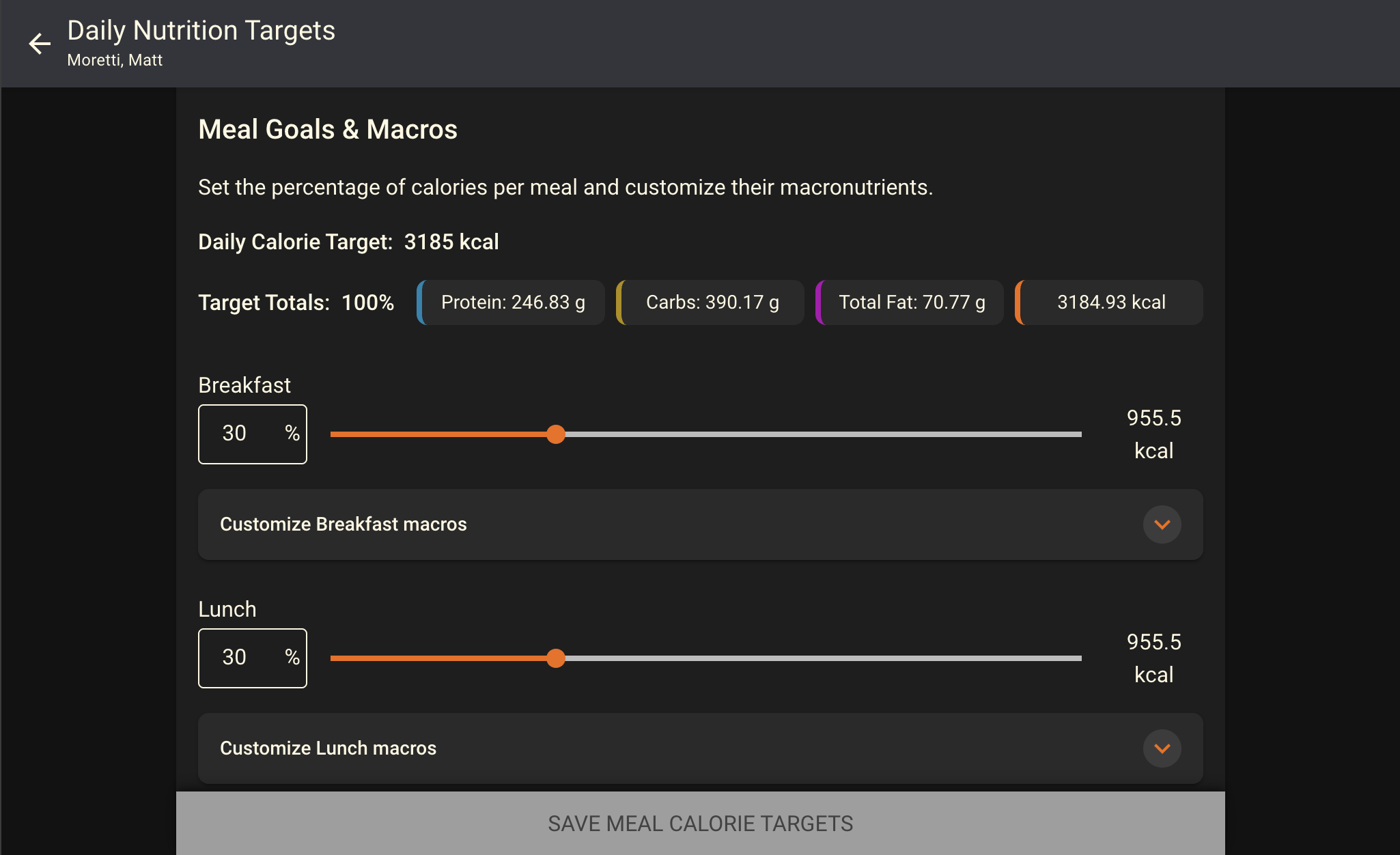
After you save the targets, there’s a meal split option worth knowing about. If an athlete tends to snack throughout the day rather than eating three big meals, you can rebalance the percentages across breakfast, lunch, dinner, and snacks so the totals still add up to 100%, but the distribution actually matches how that athlete eats. Drop breakfast and lunch down a few percentage points each, and you can build a bigger snack allowance without losing the calorie base athletes need at their main meals.
You can go even further and customize the macros within each meal individually. This part does take a little manual math on your end, so treat it as optional. If an athlete has a long run the next morning and you want their breakfast weighted more heavily toward carbs, you can set that target and adjust another meal to make up the difference. Or you can leave it as is and treat these as loosely gathered targets across four meals. Either way works. It’s meant to flex around how you coach.
Building Meal Plans for Your Athletes
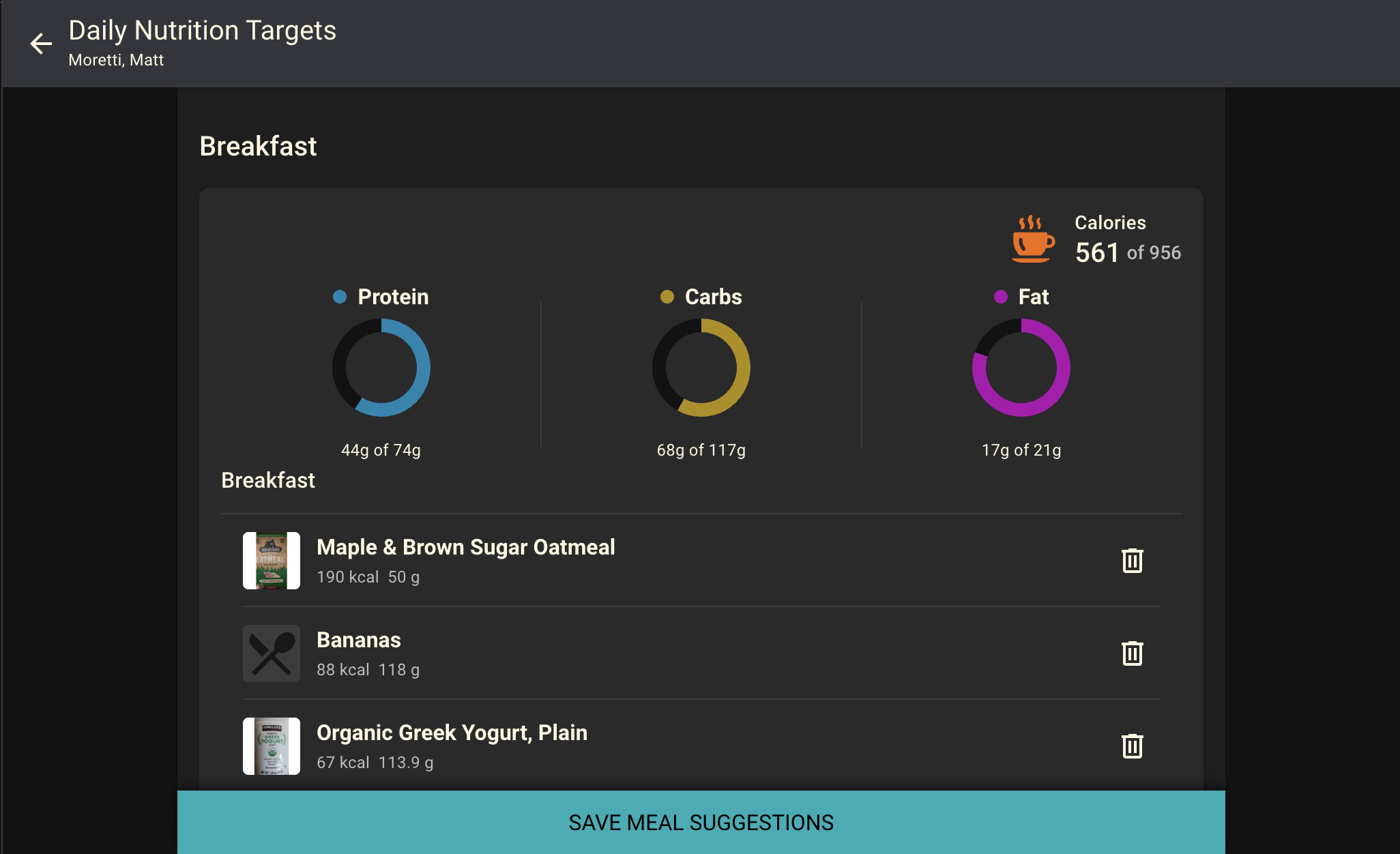
The last practitioner tool I want to walk through is meal plan building. Instead of an athlete guessing at a recipe or figuring out how to log individual ingredients, you can build out meal suggestions for them directly. Search the food database, which includes both common foods and branded foods, add items to a meal, and watch the totals populate as you go.
Say you’re building a breakfast for a runner. Add a banana, add a bagel from a specific brand if that’s what they actually eat, add a protein shake, and adjust serving sizes as you go so the meal lines up with the macro targets you set. If you’re over on protein and under on carbs, that’s fine. You can swap in a smaller protein scoop or make another adjustment until the meal is close to where you want it. It doesn’t have to be perfect.
Once you’re happy with a meal, save it as a suggestion. You can build out breakfast, lunch, dinner, and snack options, and there’s no real limit to how many suggestions you stack in. The more options you give your athletes, the better.
Watch the full overview video of the CoachMePlus Nutrition Module Updates here:
What the Athlete Sees
When the athlete logs in, they’ll see their macro targets right away as they go to log food, along with any meal suggestions you’ve built for them. If you built out that runner’s breakfast, all they have to do is tap “add all” and it’s logged.
Athletes can also add food on their own outside of your suggestions. They can search the database the same way you did as the coach, adjust serving sizes, and log meals as they go. And if they’ve got their own recipe, something they cook regularly, they can build it into a custom food entry with their own calorie, macro, and micronutrient breakdown, save it, and use it again anytime. That library stays with them.
Tracking Progress as a Coach
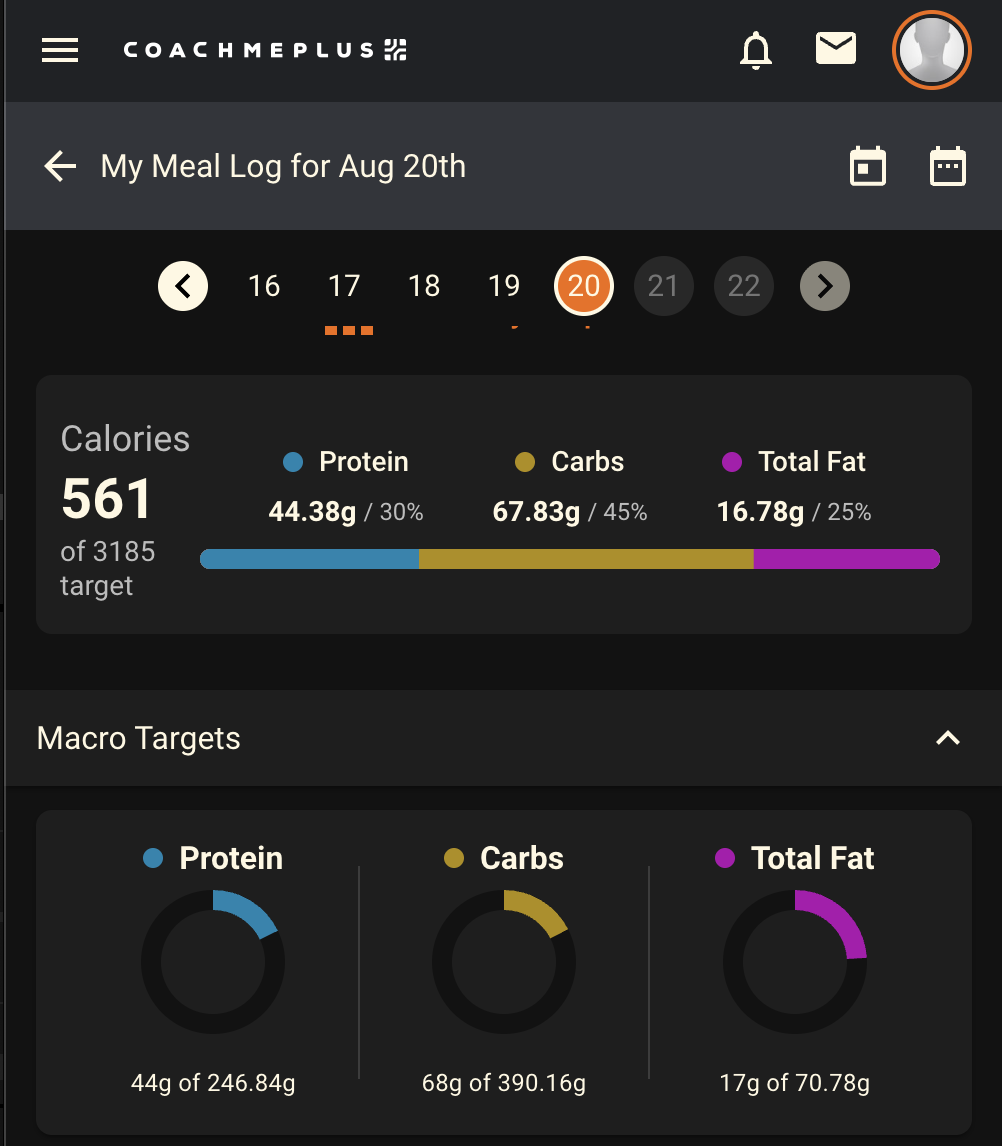
Once an athlete starts logging, you can go back into their profile and check on progress through that same nutrition widget. Click in and you’ll see calories, protein, carbs, and fat consumed against their targets for the day. You can also track micronutrients here, things like iron, sodium, or magnesium, if there’s something specific you want to monitor, whether that’s making sure they hit a minimum or stay under a threshold.
You can expand any logged meal to see exactly what an athlete ate against what you suggested. And if an athlete is hitting their calorie target but tells you they’re still not feeling great energy-wise, you don’t have to rebuild anything from scratch. Head back into the manage targets menu, bump the number up, save it, and you’re done. Maybe that’s an extra 300 calories a day. It takes seconds to adjust.
Who This Module Is Built For
This tool works across a wide range of clientele and a wide range of athletes. We’ve had it used by NFL teams, NHL teams, Major League Baseball teams, and high school programs, all in different scenarios depending on what that organization needs. It’s also been used by tactical clients, including firefighters, police officers, and paramedics, and it’s been used at the FDNY. Beyond that, it’s been used by industrial athletes, including coal miners and factory workers, to track the basics on nutrition. It doesn’t have to be complex to be useful.
Connecting Nutrition to the Rest of Your Program
What you can also do is tie nutrition data into the rest of the system. Any data point, from micronutrients to macronutrients to total calorie intake, can be plotted on a graph next to other metrics you’re already tracking. You can put it next to training load, put it next to sleep, or put it next to hydration and water intake. There’s no limit to where you can place this data to build a fuller picture of an athlete’s nutritional and performance profile over time, depending on what their goal actually is.
Turning This On for Your Program
If your organization decides it’s time for your coaches, dietitians, or performance staff to start setting real macronutrient and calorie targets for your athletes, the upgraded nutrition module in CoachMePlus is ready to go. Set targets, build meal plans, and track progress day to day, all from one platform your athletes are already using.
Recent Comments