
Key Take Aways
- A “Reps for Success” roundup pointing to help-center guides for admin tasks: adding coaches/admins and managing their permissions, archiving/unarchiving athletes without losing historical data, and reorganizing training groups between seasons.
- It also links a detailed walkthrough on bulk importing athletes, uploading large groups at once with correct settings, positions, and training groups pre-assigned.
USER MANAGEMENT
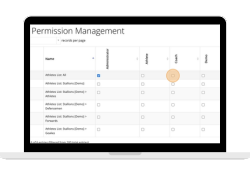
How To: Add a Coach or Admin and Manage Their Permissions
Add new coaches into your app and then customize permissions for each of them to help streamline their experiences.

How To: Archive or Unarchive Athletes
Keep your athlete list organized and simplified, while maintaining the ability to re-add athletes without losing their historical data.

How to Reorganize Training Groups
Being able to reorganize your training groups in CoachMePlus helps you keep your athlete and coach lists organized for each new season.

Adding an Athlete Via Bulk Import: A Detailed Overview
Save time uploading large groups of athletes with bulk imports. Automatically upload them with the correct settings, positions, and training groups.
Recent Comments